
Help Center
WorldShip – Shipping Multiple Packages
Triple Stitch
STANDARD OPERATING PROCEDURE
Document Title: WorldShip – Shipping Multiple Packages
SOP ID: SH-100
Effective Date: 04/08/2025
Revision Date: 04/08/2025
- PURPOSE
- To establish standardized steps for printing labels for Multiple packages in a single shipment to ensure consistency and compliance.
- SCOPE
- Departments/Teams: Shipping Department.
- RESPONSIBILITIES
- Employees shipping multi-package shipments are to adhere to this procedure.
| Role | Responsibility |
| Shipper creating packages | Properly ship packages with correct identification. |
- DEFINITIONS
- Explain technical terms or acronyms.
| Term | Definition |
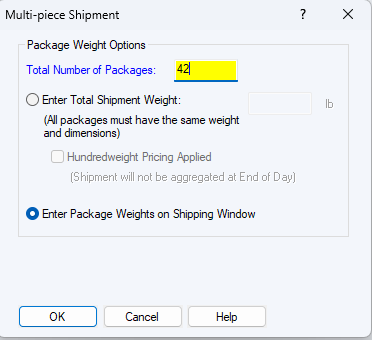
- In WorldShip on the Home menu, click “Multi-piece Shipment“.
- Enter the total number of packages in the shipment
- Choose “Enter Package Weights on Shipping Window“.
- This will allow you to enter the weight and Dimensions for each package.
- Click OK.
- Enter the Ship To Information
- Company
- Attention
- Address
- Zip Code (will fill in City and State)
- Email Address
- Phone Number
- Reference Number 1 = Order number
- Reference Number 2 = Contact Name
- Enter the package information
- Package Type
- Length, Width and Height
- Weight (manually or from the scale)
- When you move to the next package, the Shipping Label will print
- When you are on the last package, you click “Process Shipment F10” the last label will print and the shipment will process and be recorded in the history.

- ATTACHMENTS
- *List supporting documents (e.g., forms, checklists).*
- **Attachment A:** [Form Name]
- **Attachment B:** [Diagram/Flowchart]
7. REVISION HISTORY
| Version | Date | Changes | Approved By |
| Initial Release |
**8. APPROVALS**
Prepared By: Jim Barbieri 4/8/2025
Reviewed By: Jim Barbieri 4/8/2025
Approved By: ___________________________ (Name/Signature/Date)
**Confidentiality Notice:** This document is the property of Triple Stitch and may not be duplicated without authorization.